
How Business Units work with Security Roles
Business Units and Security Roles work together to control what users can see and do in Dynamics 365. Understanding the relationship between them helps you design secure, predictable access for your organisation.
What a Business Unit does
A Business Unit (BU):
- Groups users into a logical part of the organisation
- Creates a boundary for data access
- Sets the scope of many security permissions
Every user must belong to one Business Unit.
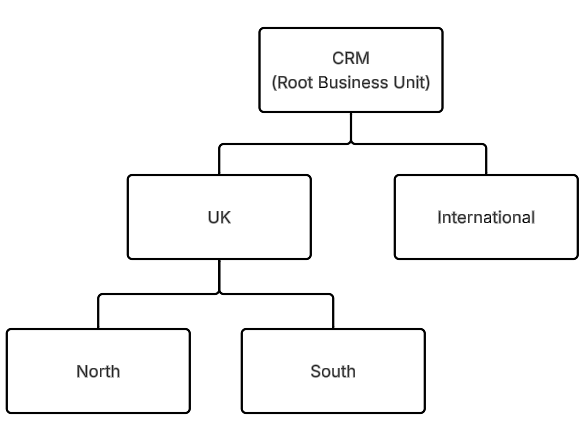
Business Units are arranged in a hierarchy with a root Business Unit at the top.
What a Security Role does
A Security Role controls what a user or team is allowed to do, including reading, creating, updating and deleting records. It also defines how far those permissions reach across the Business Unit(s):
If considering the "read" permission, options are:
- User - can only read records owned by the user
- Business Unit - can read all records owned in the user’s Business Unit
- Parent: Child Business Unit - can read all records owned in the user’s Business Unit and any child Business Units beneath it
- Organisation - can read all records in the system
The scope always applies relative to the user’s Business Unit.
How they work together
A user’s Business Unit determines the scope of the permissions defined in their Security Roles.
When a user moves to a new Business Unit, you could apply the same Security Role, but what they can access still changes because the scope is recalculated for the new Business Unit.
Examples
Consider the example Business Unit structure shown below:
Example 1: Business Unit–level access
Scenario:
- Sarah is in the UK Business Unit
- Sarah has a Security Role that gives "Business Unit" read access for Cases
This means Sarah can only see Cases owned by the UK Business Unit, Sarah cannot see Cases owned by other Business Units (CRM, International, North or South).
Example 2: Parent/Child access
Scenario:
- John is also in the UK Business Unit
- John has a Security Role that gives "Parent/Child" access to Cases
This means John can see Cases in the UK Business Unit plus North and South child Business Units. John cannot see Cases in the CRM or International Business Units.
Example 3: Organisation-level access
Scenario:
- Robert is in the International Business Unit
- Robert has a Security Role that gives "organisation-level" access to Claims
This means Robert can see all Claims across the organisation, regardless of Business Units.
Example 4: Combination of the above (most common)
Scenario:
- Emma is in the UK Business Unit
- Emma has a Security Role that gives:
- Organisation-level access to Contacts and Organisations
- Parent/Child access to Cases
- Business Unit access to Tasks
This means Emma can see all Contacts and Organisations across the organisation, Cases within the UK, North and South Business Units, and Tasks within the UK Business Unit.
Assigning roles to Teams
You can assign Security Roles to Teams as well as Users. A Team belongs to a Business Unit in the same way as a user, and any user who joins the Team inherits its Security Roles as well as their own (multiple Security Roles can work in combination to provide a total set of permissions). This is useful when users across different Business Units need shared access.
Example 5: Cross-team working
Scenario:
- The Escalations Team is in the UK Business Unit
- The Escalations Team has a Security Role which gives Business Unit level permissions to Case records
- Daniel is in the International Business Unit and cannot see Case records in the UK Business Unit
- Daniel gets added to the Escalations Team
This means: Daniel inherits access to Case records in the UK Business Unit through the Team membership, without needing to move Business Units.
Key things to remember
- A user can only belong to one Business Unit
- A Security Role's scope always applies relative to the user's Business Unit
- Adding users to Teams in another Business Unit can extend access without changing the users Business Unit
- Organisation-level access gives access to everything
- Moving users between Business Units changes the data they can see
Summary
- Business Units define where a user sits
- Security Roles define what a user can do
- Teams can bridge the gaps for exception scenarios
- Together, they determine what data they can access